

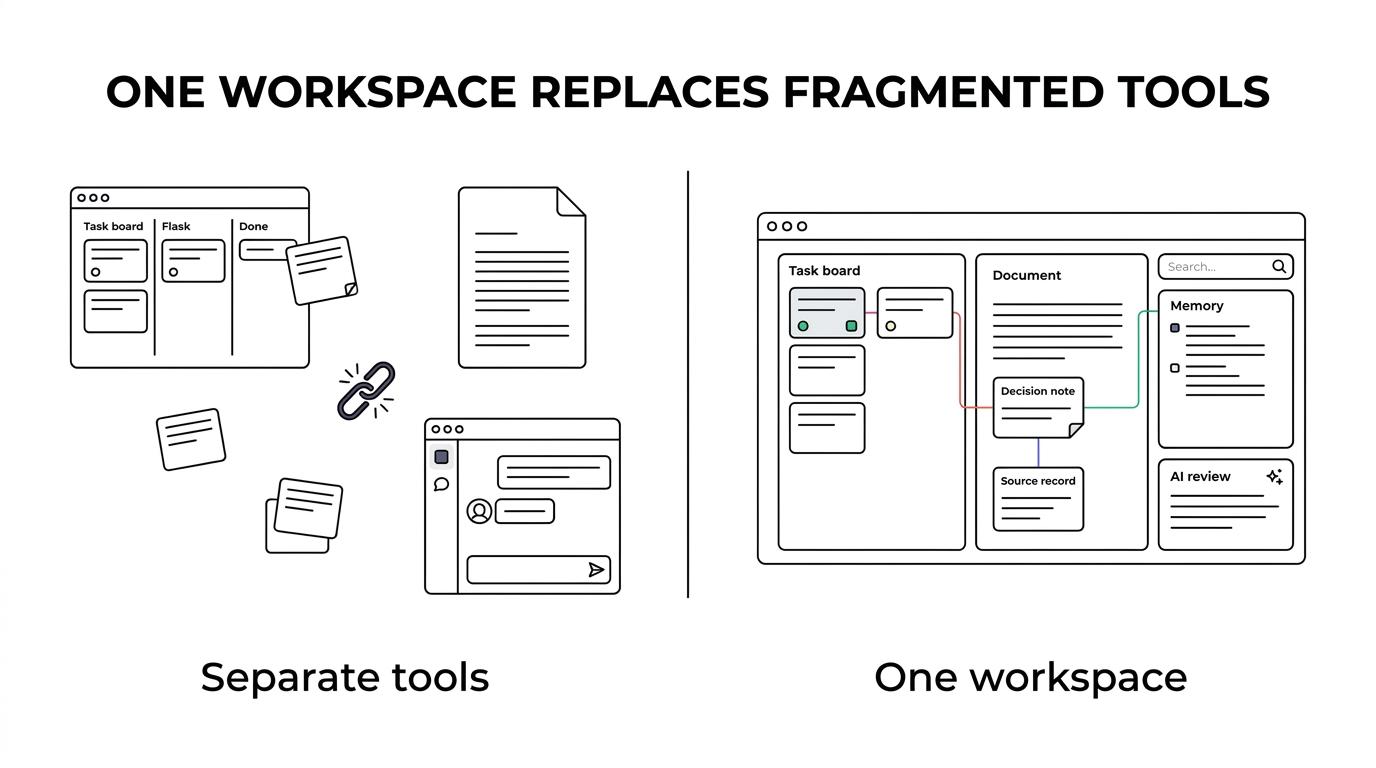
When your project management docs in another, and your team company memory is buried in chat, work slows down in ways that are hard to measure but easy to feel. TOW solves that by bringing project management, documentation, company memory, search, and reviewable AI into one unified workspace that you can run in the cloud or on your own infrastructure.
TOW is built for teams and organizations that need integrated execution and knowledge with strong admin controls and clear data ownership. If you are trying to replace a patchwork of Jira, Confluence, Notion, Linear, and disconnected AI tools, we give you one system where work, context, and decisions stay connected.
Unified project and knowledge management software for teams that need one workspace
A unified workspace matters because project delivery and knowledge management are not separate problems. ISO describes knowledge management as a cross-cutting discipline that works across functions and roles, and that is exactly where fragmented stacks tend to fail. TOW combines issues, boards, goals, roadmaps, docs and wiki content, search, workspace memory, and AI in one operational system so your team can plan, document, find, and act without switching between disconnected products.
Microsoft’s workplace research found that 62% of respondents struggle with too much time spent searching for information during the workday. TOW addresses that friction directly by keeping projects, docs, memory, and search inside the same workspace and permission model, so the information you need is easier to find in the place where work is actually happening.
“TOW brings projects, docs, memory, and AI into one workspace instead of forcing your team to search across separate systems.”
That consolidation changes the daily experience of work. Instead of asking where something lives, your team can move from a ticket to the related decision, from a document to the source records behind it, and from a summary to the exact references that support it.
TOW connects projects, docs, company memory, and search in one permission model
TOW gives you project management with issues, boards, goals, and roadmaps, alongside docs and wiki content that are tied to the same workspace. That means the project plan, the operating context, and the historical record are not scattered across tools with different access rules and different search behavior.
TOW search works across knowledge surfaces such as Memory, Docs, snapshots, tickets, decisions, risks, and events, depending on the view. For your team, that means less time reconstructing the story behind a project and less risk that critical context stays trapped in a document nobody knows to search for.
“TOW search spans Memory, Docs, snapshots, tickets, decisions, risks, and events, giving teams one place to trace work back to source context.”
TOW also uses references and backlinks so people can move from a summary to the source records behind it. If you care about auditability, technical context, or decision hygiene, that matters because the knowledge in your workspace is connected rather than flattened into isolated pages.
Here is what that unified model helps you avoid:
- Duplicate work: the same update copied across issue trackers, docs, and status notes
- Context loss: decisions and risks separated from the work items they affect
- Search friction: team members wasting time looking across multiple apps for the latest version
- Permission gaps: access rules drifting between project tools, docs, and AI systems
Self-hosted or cloud deployment with stronger admin control and data ownership
Some teams want convenience. Others need infrastructure control, internal hosting requirements, or air-gapped environments. TOW supports both cloud deployment and self-hosted deployment, so you can choose the operating model that fits your security, compliance, and procurement reality.
TOW is especially relevant if you do not want your workspace architecture to force your hosting decision. You can run TOW on controlled infrastructure, use the cloud, bring your own AI keys, or use TOW-managed AI endpoints depending on what your organization allows and how much operational control you want to keep.
“TOW supports cloud or self-hosted deployment, including environments built for tighter infrastructure control and data ownership.”
Admin behavior is concrete, not vague. When an administrator changes organization membership, group membership, or a project role, document access changes immediately. That reduces lag between role changes and actual data access, which is important when teams are moving fast or access boundaries need to stay current.
TOW also includes auth, admin controls, and migrations from Jira, Confluence, and Notion. That gives you a clearer path from a fragmented stack to a unified one without pretending migration is a separate problem from adoption.
Reviewable AI for project and knowledge workflows, not opaque automation
Many teams are interested in AI but not in handing over silent write access to their operating system. TOW handles that concern by separating AI assistance from acceptance. The platform uses review-oriented flows, so proposed changes are visible with context before they become part of your official workspace.
TOW’s workspace-aware AI agents operate inside the same environment as your projects, docs, and memory. Because AI actions are permission-aware and reviewable, you get practical assistance without losing oversight over what changed, why it changed, and whether it should be accepted.
The review inbox is a key part of that control. TOW makes proposed changes visible with context and explicit accept-or-reject controls, which gives your team a cleaner approval path than black-box automation.
That matters if you want AI to help with drafting, organizing, and surfacing information while keeping humans in charge of what becomes record, plan, or policy.
TOW helps startups, technical teams, public services, and enterprises reduce tool sprawl
TOW is designed for organizations worldwide that need integrated projects, docs, and AI with stronger governance. That can mean a startup that wants one workspace instead of five subscriptions, an internal platform team that needs self-hosting control, or a larger organization trying to reduce fragmentation without giving up admin boundaries.
TOW is also relevant when your work crosses departments. ISO’s guidance on knowledge management emphasizes lifecycle management and cross-functional use, and TOW reflects that with one workspace model that spans execution, documentation, memory, and search instead of treating them as separate software categories.
If your team is comparing TOW with Jira, Confluence, Notion, or Linear, the practical difference is the operating model. TOW is aiming for parity with those categories while combining them into one workspace with a shared permission model and reviewable AI behavior.
Migration and day-to-day adoption without rebuilding your operating habits
Replacing multiple systems only works if the new workspace is usable for real work, not just attractive in a demo. TOW supports migrations from Jira, Confluence, and Notion so you can move existing project and knowledge assets into a unified environment rather than starting from scratch.
Once inside TOW, day-to-day work becomes simpler to manage. Teams can track issues, update docs, search across connected records, receive notifications, and use AI assistance inside the same workspace, which reduces context switching and helps preserve focus time.
Microsoft reports that the average employee spends 57% of time communicating and 43% creating. TOW is built to reduce the operational drag behind that imbalance by keeping execution and knowledge closer together, so your team spends less effort coordinating between systems and more time moving work forward.
To make buying easier to evaluate, TOW offers options for different operating constraints:
- Deployment choice: cloud or self-hosted, including controlled infrastructure needs
- AI control: bring your own keys or use TOW-managed AI endpoints
- Team entry point: a free self-hosted tier for small organizations
When TOW is the right fit for unified project and knowledge management
TOW is a strong fit when you already know that separate tools are creating friction and you want one workspace to replace that fragmentation. It is especially relevant if your organization cares about any mix of searchability, admin control, self-hosting, AI oversight, or keeping project work tightly connected to institutional knowledge.
You are likely a good fit for TOW if:
- You need one workspace: projects, docs, memory, and AI should share context instead of syncing across tools
- You need control: self-hosting, admin boundaries, and explicit data ownership are part of the buying decision
- You need accountable AI: AI suggestions should be reviewable before they become accepted changes
- You need durable knowledge: decisions, risks, events, and documents should stay connected to execution
TOW was built in Germany for air-gapped high-end security environments and public services, which is a useful signal if your requirements go beyond convenience and into infrastructure trust, reviewability, and controlled access.
If you want unified project and knowledge management software that can run in the cloud or on your own infrastructure, TOW is ready to show you how that workspace can look for your team. Explore TOW for your environment, migration path, and control needs, and start with the setup that fits how you actually work.